
Frequently Asked Questions
And thoughts from the creator of DICTATORSHOP products.
How do I change the colour or texture?
This is the question I am asked more than any other, so let me make it impossible to get wrong. Click the DS logo on the piece. Somewhere on the item you will find a small DS logo button. Click it and the colour and texture menu opens right up. That is the whole secret. There is no HUD to wear and nothing to memorise, just a click on the little logo.
- Find the small DS logo on the item. It is usually on the back, or on the lower right as you face the piece. It is small, but it is there.
- Click it to open the colour and texture menu.
- Choose whatever you like from the menu, and the piece updates straight away.
If you have been right-clicking the item and hunting through menus, stop and look for the DS logo. That is the button you want.
There is a reason I do it this way. A button means you do not have to sit on a piece to decorate it, and it means your guests are not tempted to redecorate for you. If you prefer, the logo button can be locked down without affecting the use of the furniture, so your styling stays exactly as you left it.
A few of my pieces, such as the Essenti set, come with a colour-change HUD instead. If you find one in the box, wear it and click your options there rather than on the item.
Maturity ratings on furniture
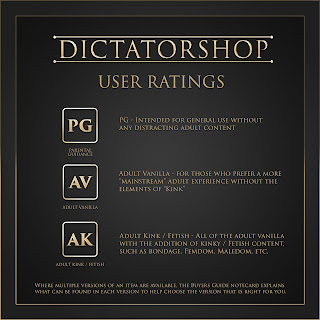
Those of you who shop with DICTATORSHOP have probably noticed these ratings on all of the latest sales posters. I use these categories to help shoppers find the right level for their needs.
In the past few years I have begun making more mainstream looking furniture, and some customers prefer more general audience or adult vanilla in some or all of their pieces so they can mix and match.
I use PG rather than G because, well, we are all adults, and it seems to be more recognised by the internationals than G. Most of the PG stuff you could have in front of your grandmother and not feel too concerned.
Adult Vanilla is the step between general audience PG and any fetish or kink. You will find warm-ups and mainstream sex, but no bondage or fetish kink.
Adult Kink encompasses the first two levels and adds the extra-naughty stuff for when you want all the possibilities open.
Dominance and gender
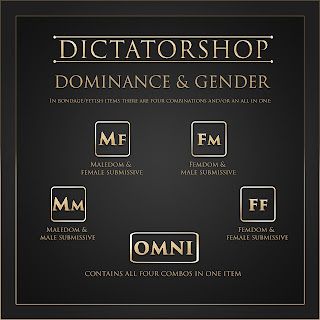
For the Adult Kink items there are four categories, and an all-in-one. The first letter (shown in caps) shows the Dominant in the combo, and the second letter indicates the sub. OMNI means all four dominance and gender combos are included.
I am careful in my mixed sets to give each of the four combinations some of their own animations, not just the same things readjusted for everyone. Anyone who has been in SL a while knows the old swap-and-adjust dance; I have made these separate menus so that all of the animations are adjusted as well as possible for the desired combo.
In Femdom (male or female sub versions) there are usually strap-on animations broken out into their own menu, so users can be sure who is doing what to whom. Strap-ons, unlike other auto-rezzing items, are not included, as I have found that ladies prefer to use their own adjustable ones, and it is simply too difficult to make an attachment of this sort fit everyone automatically given all the mesh bodies out there. The strap-on menus also work well for trans avatars as they are.
Avatar size and fit
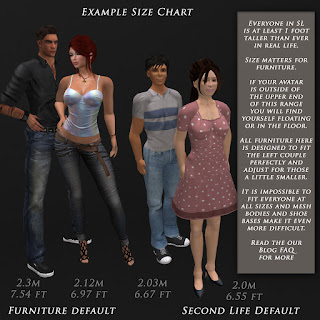
All avatar placement happens from the hip location. This gives animators no control over where your hands and feet end up, since the only control is right at your centre. So if your avatar is too large or too small, furniture is simply not going to fit you well. Too big and your feet are in the floor; too short and you are floating. It can be the difference between drinking your tea and lobotomising yourself with the teacup, because your height affects how long your arms are.
At DICTATORSHOP I tend to adjust large, because in my many years in SL I have found that men tend to stretch themselves as tall as they can. Gents, you are not doing yourselves any favours. The ladies tend to go small, which is also no favour. If you are 5'4" in real life, please do not make yourself 5'4" in SL, because no furniture is going to work for you without serious adjustment.
Ideally, for most male and female couples poses, the male is only one head taller than the female. If you and your partner are wildly different sizes, you will find he is poking her eyes out rather than caressing her face, and she is floating all over the place. The only poses that always fit are the ones where the hips are doing the work, since that is the only point we have control over.
I use animations from a variety of quality creators, and the default sizes appear fairly standard across all of them. It is possible to adjust your furniture to fit you better, but in the end I would recommend trying a lot of furniture, not just mine, and seeing how you fit. If you find yourself all over the place consistently, it may be easier to adjust yourself a little than to adjust every single pose in every piece you own. We do not live in a one-size-fits-all Second Life.
Auto attaching rezzables (cuffs, etc.)
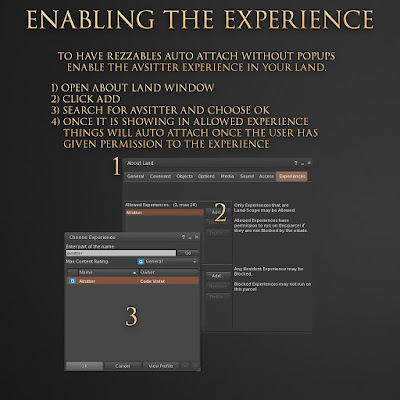
Some folks find the multiple pop-ups for attaching off-putting. This is easily fixed by enabling the AVsitter experience on your land.
The sit system: AVsitter
Now that AVsitter is open source, I include the adjuster, which lets any owner use the Helper prims to adjust the poses. Once you have everything how you like it, choose Dump from the menu and it will spill all of the settings into local chat, with a web link at the end. Click that link, copy all of the settings out of the webpage, and save them back into the AVpos notecard in the furniture; then your settings are permanent, even if the scripts are reset.
To remove menus you do not wish to see: if you have an Adult Kink item and you only want Femdom or Maledom but not both, find the offending line (similar to those below), which appears under the Adult Kink menus at the top and middle (the sitter 0 and sitter 1 sections). Remove the whole line of the one you do not want, save the notecard, and the scripts will reset.
MENU AdultKink
TOMENU MaleDom
TOMENU FemDom
RLV settings in AVsitter items
For RLV enabled items there is a section at the top of the notecard that is not read out, and care must be taken not to remove it. The items are copy, so you always have the original to revert to. Anything above a line like "REMEMBER TO LEAVE RLV SETTINGS ABOVE" needs to stay in place for your RLV furniture to function.
You can change the default settings in your AVsitter enabled DICTATORSHOP furniture (everything created after January 2015). Always make a copy of the AVpos file before editing it, just in case. The controls live in the Contents tab when you edit the item, in the AVpos notecard:
- RLV 1: RLV on or off, on by default (1 = on, 0 = off).
- TIMELOCK 5: default number of minutes captured. Default is 5, to give the dom a chance to take the keys.
- RECAPTURE 1: 1 means recapture after relog, 0 means do not.
- SUBCONTROL 1: 1 means the sub can see the menu, 0 prevents it.
- ONSIT: what happens when someone sits voluntarily (see below).
- ONTOUCH: what happens when the furniture is touched with no one sitting (see below).
- ONCAPTURE: what happens when someone is captured (see below).
- ONRELEASE @unsit=n: automatically unsits when released; n keeps the sub on the toy after release.
ONSIT options, what happens on a voluntary sit:
- ASK: ask the avatar to choose a 'D' or 'S' role. They are moved to the first available sitter for that role, or unseated if none are free. Choosing 'S' will attempt to capture them.
- ASKONLY: same as ASK, but choosing 'S' will not attempt to capture. They can still be captured via the menu.
- CAPTURE: sitting attempts to capture the avatar if they wear an RLV relay (default).
- NONE: sitting voluntarily will not attempt to capture.
ONTOUCH options, when touched with no sitters:
- ASK: search for RLV relays in range (20m) and ask who to capture (default).
- CAPTURE: capture the avatar who touched it, if they wear an RLV relay.
- NONE: do nothing.
ONCAPTURE defaults to @unsit=n|@fartouch=n|@acceptpermission=add, which will not let the captured sub stand or touch anything over 1.5 metres away. To add restrictions, put a pipe between each item before the @ symbol. For example, @camunlock=n keeps the camera near the toy, and @chatshout=n prevents shouting.
For the full list of what is available, see the RestrainedLove API wiki.
Land impact
Many creators of those very low land impact items you see around recommend an LOD 4 setting in your viewer to best see their objects. That is part of how they get their prim counts lower than you will find at DICTATORSHOP: they cut corners. I design all of my furniture to look as good as it possibly can for everyone. The same is true of my textures: everything has materials enabled, but will still look great even with advanced lighting off. You can look at my items at LOD 2 (the default) and cam out quite a distance before anything deforms. Set your graphics to the very lowest settings and you will still see the shadows, and everything will look nearly as good as it does at ultra. This means the latest DICTATORSHOP furniture looks the same for everyone, rather than turning into a textureless mangled triangle for your visitors on lower-end machines. Here is some more about LOD and why the default setting is best.
Price
You get what you pay for. Ever noticed the menus on most of those really cheap pieces? Sit1, Sit2, Sit3, and often one adult menu where everything is scrambled together and you cannot tell a muff dive from a blow job until you click the button. Menu surprise is a pet peeve of mine, and I work hard on making the menus logical and flowing from one section to the next. Have a good long look at any menu in a DICTATORSHOP item and you will find a rich, carefully divided menu set that tells you what you will find even if you do not know the exact name of the animation you want.
Inside every DICTATORSHOP piece is a small fortune in quality animations from many of the best animation creators in SL. I am exceedingly picky about the animations, and spend countless hours adjusting every engine to fit the widest variety of avatars. Since early 2017 I have built each new bondage engine with OMNI, M/f, F/m, F/f and M/m, where each menu set is carefully arranged for the gender and dominance mix using it, so users do not have to do the old swap-and-adjust dance.
In addition to the animations, most of my pieces come with either a texture menu (find the DS logo and click) or colour change inside them, usually via a HUD. This lets you change and even add packs later, without replacing the furniture and relearning new menus.
Every piece is designed to go the distance with you. It is my hope that you will rez one of my pieces years down the road and like it just as much as you do now. Quality is timeless.
Lost something? Get a redelivery
It happens. An item slips out of your inventory, a folder goes walkabout, or a delivery never quite lands. Do not panic, and do not buy it again. You can fetch a fresh copy yourself, for free, from our redelivery kiosk.
- Come to the main store and go to the info desk, where the redelivery kiosk sits.
- Click the kiosk. It runs on CasperVend, so it shows you the entire list of everything you have ever bought from DICTATORSHOP.
- Find the item you want and request it. It drops straight back into your inventory.
Teleport to the redelivery kiosk
The reason this works so smoothly is how my pieces are made. Nearly everything I sell is copy and modify, no transfer, so a clean replacement can always be sent to you. A lost item is never really lost, it is simply a quick trip to the kiosk away.
If you have searched your inventory, tried the kiosk, and are still stuck, drop me a note and I will sort you out personally.
Add-ons
Does your stuff have my cock/pussy/tits/drippy liquid reaction integrated? No, it doesn't. We believe our products outlast whichever the current brand is or was, and the impact of that integration is huge, because it adds scripts, and therefore lag, to every interaction you have on the piece. Remember Excite? Exactly. We know you are more than capable of managing your appendages for yourself when you believe it is important; that is not our business. We make furniture for everyone, not just those with a brand-name bit.
Have a question that is not covered here? Contact DICTATORSHOP Resident in-world.